Security — Signify Interact for Intelligent Buildings
Introduction
As lighting systems have become an integral part of the Internet of Things (IoT), they are exposed to the same security risks as any other Internet-connected device.
This section addresses security concerns and provides steps to mitigate security issues.
Companies use well established procedures to reduce risk of corporate data breaches via devices connected to the company’s internal network. Company-issued computers, smartphones, tablets, and so on, are considered attack vectors which are required to comply with certain rules to be trusted and granted access to an internal corporate network. The same procedures apply for IoT systems that connect to a corporate IT network.
At Signify, the Corporate Security Office manages security governance.
The Product Security Leadership Team, which includes members from the Corporate Product Security organization, business groups, and Product Innovation team, coordinates our security efforts.
A network of security architects and security specialists embedded in the development teams supports security activities related to product development.
All Signify employees are required to attend regular cybersecurity and privacy awareness training. System architects and development engineers must also receive additional security training and internal certifications.
Signify Interact for Intelligent Buildings mitigates security risks of a lighting IoT system by employing security strategies that are described later on in this section.
The key concerns regarding an IoT solution deployed on a corporate IT network are the following:
-
Vulnerabilities that result in access to devices or network components on the corporate IT network, such as login credentials, access to servers or storage locations.
-
Vulnerabilities that disturb operational performance of individuals or equipment working in a building. It ranges from operating the lights in such a way that it disturbs individuals to fully jamming the network in the building.
-
Vulnerabilities in IoT devices that can be used to compromise other services, such as botnets.
Implementation of security principles
All of our internal and external development activities follow the Signify Security Development Lifecycle (SDL), which codifies industry accepted best practices. The major components of the SDL are security risk analysis and threat modeling, code analysis and review, and vulnerability management. We apply the SDL to all of our hardware products, systems, services, software, and cloud solutions.
In accordance with the SDL, Signify takes the following actions during design, development, and testing:
-
A security risk analysis, based on Signify security requirements aligned with the ISA/IEC 62443 standards suite, is performed for every new project and for every significant change to an existing project.
-
Automated code analysis and manual code reviews are regularly performed during development. These analyses and reviews are based on, but not limited to, such frameworks as OWASP IoT Project and the OWASP Top Ten Project.
-
Third-party code, including open source code, is automatically analyzed to identify and mitigate vulnerabilities.
-
Hardening of the operating system is performed for embedded devices and cloud-based solutions.
-
Appropriate network security and firewall rules are implemented and reviewed regularly.
-
Encryption of data in transit and at rest is implemented according to generally accepted industry standards as described in the Federal Information Processing Standard Publication 140-2 (FIPS 140-2).
-
Penetration tests are performed before each customer release by internal teams and external parties at a minimum of once a year.
The Innovation team is responsible for evaluating the latest IoT security technologies, and supports the development team in making the right choices when introducing new security algorithms, solutions, and technology partners.
Signify regularly audits its partners and supply chain to maintain the appropriate level of security in the manufacturing process.
Architecture and security
The figure below depicts an overview of a Signify Interact for Intelligent Buildings system.
Signify Interact for Intelligent Buildings connected system overview:

Cloud connected to a portal and, via the corporate IT network, to gateways. Each gateway bridges to Zigbee mesh networks of light and control devices. The mobile app connects to the cloud and, via Bluetooth, to individual lights for commissioning.
Signify Interact for Intelligent Buildings non-connected system overview:

Cloud used as a backup for secure access across phones/users. The mobile app connects to Zigbee mesh networks of lights via Bluetooth, with essential security data backed up in the cloud.
In Signify Interact for Intelligent Buildings, light control is implemented using a wireless mesh network based on the Zigbee protocol: two-way communication between lights and discrete controls is solely based on this protocol. Commissioning and user control are done using a mobile app.
When the system is connected to the internet via gateways:
-
Bluetooth can be used for two-way communication between the phone and individual lights for commissioning.
-
Lighting control is enabled via the gateway: the phone communicates via the cloud with the gateways and the gateways (edge devices) communicate with the lights via Zigbee.
For connected systems, each gateway is the trust center for all the other Zigbee devices in the network it is connecting to.
When the system is not connected via gateways:
-
Bluetooth is used for two-way communication between the phone and individual lights for commissioning and control: the phone connects to a light via Bluetooth and information is shared across lights using the Zigbee protocol.
-
Essential security data is backed up in the cloud to enable secure transfer of access rights to the system to other phones and authorized users.
For non-connected systems, mobile phone enables the creation of network.
In both cases, non-connected and connected, system security is addressed end-to-end to guarantee data confidentiality, integrity, and availability: to ensure this, network security, device and physical security, communication security for in-transit data, cloud security as well as installation security aspects are addressed.
Third-party integration
The following types of third-party integration are available in Signify Interact for Intelligent Buildings:
BACnet integration
To enhance network security, an ACL that only allows network traffic to the BACnet port (47808) is required on the BMS and lighting networks. All other traffic unrelated to BACnet functionality must be blocked.
Since the BACnet protocol relies heavily on Broadcast messages and network segmentation must be applied between BMS and lighting subnet, a third-party device such as BBMD must be used for integration. This device allows the transport of BACnet Broadcast messages from one VLAN to another.
The hardening and updating devices are essential steps to protect them from cyber-attacks.
Hardening the network could mean:
-
Disabling unnecessary services
-
Closing unused ports
-
Disabling unnecessary features
-
Updating to the latest firmware versions
| The BMS integrator must follow the best practices and guidelines from the BBMD vendor. |
API Integration
An identity management system is used to control access to the cloud platform to access data or services in the cloud.
The authentication for APIs is done via OAuth 2.0 protocol using a set of credentials, namely a username and a password.
The authorization endpoint returns a generated JSON Web Token (JWT) which is later used to authenticate when making calls to other endpoints.
Network security
Various encryption techniques are used to ensure that all communication is protected end-to-end between devices used in the Signify Interact for Intelligent Buildings system. To protect the Signify Interact for Intelligent Buildings cloud services, only Interact devices can access them. This is ensured by using unique device credentials that are assigned to all devices during production. The identities of all of these devices are maintained in the cloud platform. Only devices with a known credential can communicate with Signify Interact for Intelligent Buildings cloud services.
All communication between devices on-site and the cloud is done by Signify Interact for Intelligent Buildings gateways. This communication is encrypted using the standard TLS 1.2 or 1.3 protocol. Authentication ensures that only these Interact devices are communicating with our cloud services. Furthermore, all communication is enabled inside out: that is, the gateway connects to the cloud rather than the other way around.
Gateways do not store data: they relay data coming from other devices to the cloud. To optimize communication and to bridge periods with limited connectivity they may temporarily store some data in memory. However, they are connected to the customer’s IT network and have ample computing and memory resources. To prevent tampering with gateways, so that they can’t be used to compromise the customer network or access data, they are hardened to minimize attack surface and vectors.
Wireless lights, sensors and switches communicate over a Zigbee mesh network (IEEE 802.15.4), with frames protected by symmetric AES-128 encryption in CCM mode for both confidentiality and integrity. Each network uses its own randomly generated key, managed by the network’s trust center.
The Signify Interact Builder app can directly communicate with the latest generation of wireless devices that besides Zigbee also allow for Bluetooth communication (only between mobile devices and an Interact device). Bluetooth security builds on the security libraries of the operating system of the supported mobile phone platforms, iOS and Android. The complete security solution consists of:
-
A Signify specific implementation of a key exchange protocol using the standard NIST SP 800-56A C(2e, 2s) ECC CDH: Elliptic-curve Diffie-Hellman using two static keys and two ephemeral keys (https://nvlpubs.nist.gov/nistpubs/SpecialPublications/NIST.SP.800-56Ar2.pdf) where ECC used P-256 curves.
-
Signify Interact Builder-specific Bluetooth messages are encrypted with a standard AES CCM crypto algorithm using a 256-bit AES key.
Device and physical security
Interfaces on Wireless Gateways are always using encrypted communication. Our end devices always use the Zigbee security layer.
All device features and requirements are aligned with the OWASP IoT framework and built with security in mind. The devices' Operating Systems are hardened by whitelisting of services and libraries.
Firmware updates are started using the app or portal by authorized users. All firmware images are signed and verified before being deployed on end devices.
Wireless Gateway
The gateway is a bridge between the Zigbee devices in the lighting network and a wired network using an Ethernet interface. Via this interface, it communicates securely with the Interact cloud platform. It has the following security features:
-
Hardened operating system
-
Non-availability of hardware debug interfaces
-
Disabled user login
-
Secure updates via signed firmware images
-
Encrypted communication
-
Using TLS to communicate over the internet with the cloud
-
Using encrypted Zigbee to communicate with the light network
-
Light and control devices
Lights, sensors and switches are based on electronic devices that perform two-way communication in the lighting network using Zigbee. The mobile app can also directly communicate with a Bluetooth-enabled device.
They have the following security features:
-
Non-availability of hardware debug interfaces
-
Disabled user login
-
Secure updates via signed firmware images
-
Encrypted network traffic
-
Using Zigbee to communicate between system devices
-
Using Bluetooth to communicate between mobile app and system devices
-
Decommissioning
This section explains the details regarding decommissioning of Wireless Gateways and Zigbee devices.
Wireless Gateway
The Wireless Gateway regenerates the operational credentials on every power cycle. This means that the credentials are regenerated when a Wireless Gateway is powered again. When decommissioning, each device must be first removed from the web interface and then from the Cloud Device Registration Service. To perform this action, you must contact the Operations team. The second step is to remove the physical device by powering it off and then unplugging all cables.
Cloud services
The cloud platform is a key component of Signify Interact for Intelligent Buildings:
-
In the internet connected (gateway) configuration, the lighting system is normally 24/7 connected to the cloud platform for remote access and monitoring.
-
In the non-connected configuration, the cloud platform is used as a backup for security credentials that are required to access the system. Without such a backup, transfer to other phones and users is impossible. Security is given top priority to make sure that data is protected against unauthorized access and that the cloud services can only be accessed by authorized users (including devices communicating with the cloud).
Because the lighting system (in the connected configuration) is permanently connected to the cloud platform, system security is given top priority from the specification phase onwards, taking into account the full hardware lifespan of each installation.
All cloud development and operations follow the Signify Security Development Lifecycle (SDL) described in Section 2. In accordance with the SDL, cloud releases are subject to security risk analysis and threat modeling, automated and manual code review, analysis of third-party and open-source code for vulnerabilities, operating-system and application hardening, regular review of network security and firewall rules, encryption of data in transit and at rest according to generally accepted industry standards, and penetration testing by internal and/or external parties before each customer release. The Innovation team evaluates the latest IoT security technologies and supports the development team when introducing new security algorithms, solutions, and technology partners. Signify also regularly audits its partners and supply chain to maintain the appropriate level of security in the manufacturing process.
Encryption and key management
Signify Interact for Intelligent Buildings uses only NIST-approved encryption algorithms ensuring that only strong cryptographic algorithms are used:
-
Data in-transit between a gateway and the cloud platform is encrypted using TLS 1.2 or 1.3.
-
Zigbee network traffic uses the Zigbee security mechanisms as defined in IEEE 802.15.4. Messages are encrypted using a unique 128-bit AES key (each Zigbee network has its own unique key).
-
For Bluetooth communication between a mobile phone and Bluetooth-enabled lights, a solution is used based on a key exchange protocol using the standard NIST SP 800-56A and messages are encrypted using the AES CCM crypto algorithm with a 256-bit key. The implementation builds on crypto libraries provided by iOS and Android OS.
Business continuity
High availability of cloud services is an important objective. For Signify Interact for Intelligent Buildings cloud services, an architecture with a redundant system with automated failover is implemented. Availability target of cloud services is over 99%. Historically, the last year availability has been close to 100%.
Signify Interact for Intelligent Buildings has a 24/5 service time, that is, service is available throughout the day worldwide on regular business days. The operations team reacts within 4 hours for incidents where the service is down, and 1 business day for minor incidents. Outside service time, only an emergency service is available and the response time will be 24 hours.
Backups are available to be able to recover to a point in time. Backup data is kept for 1 month for the primary backup. An additional backup is kept with a retention time of 1 year.
Dedicated failover and disaster recovery plans are in place to ensure that, in the unlikely event of an outage, the complete system can be restored. These plans are validated through disaster recovery tabletop exercises, which we aim to conduct on an annual basis.
Authentication and authorization
Signify Interact for Intelligent Buildings uses an identity management system to control access to the cloud. It manages user accounts and the privileges or roles for those accounts. Depending on the role, a user has access to one or more projects and to specific functionality in the system. A user can access a project securely after login with their credentials on the Signify Interact Builder mobile app or web portal.
Gateways also use the identity management system when they connect to the cloud using unique device-specific credentials. These credentials are securely stored on each device as part of the production process. The process is documented and follows strict security requirements on handling this data. It is supervised by a dedicated security officer.
To identify gateways when they are added to a project, their unique MAC address can be captured by the mobile app. This associates a unique device (with unique credentials) with the project it is added to. Access to this project is only allowed by authorized users of that project.
System updates
The Signify Interact for Intelligent Buildings cloud is updated regularly to ensure that security vulnerabilities are dealt with in a timely manner. Before deploying an update, a new release is tested at various levels to ensure data consistency and to prevent accidental data modifications. As part of the test process, security tests are executed for every release.
Security issues, when they are discovered, will be prioritized over the development of functionality to guarantee that a patch is deployed quickly, mitigating the issue. Release procedures guarantee that such an update can be made available without impacting quality.
Operations
At Signify, we implement a security policy which enforces segregation of duties and least privilege access.
The Signify Interact for Intelligent Buildings cloud services are managed by a specialized global operations team to ensure proper segregation of duties for system administration purposes. Responsibilities of the team include producing operational specifications and performing maintenance, security updates, vulnerability management, backup, logging, monitoring, and management of events and incidents. The team also performs periodic review of network and application security. Development teams and in general other personnel do not have access to production systems or production data. In case access to data is necessary, for supporting operations, only the Operations team is allowed and strictly for the limited time and scope needed.
Privacy and data governance
Signify Interact Builder application services (mobile app, and web portal) are managed by the concept of Projects. A Project is characterized by (part of) a building at a specific location and dedicated user account(s). Data of different projects are separated from each other. All data of a project is considered confidential.
Data of all Projects (except China) is stored with the following cloud provider at the following locations:
-
AWS region Europe (Frankfurt) - Germany
-
Device registration of the Wireless Gateway: AWS region Europe (Ireland) - Ireland
For reliability and availability, backups are stored at two different locations to be able to recover from a major system event.
Data is stored in the form of:
-
Database entries on servers
-
System generated emails
-
Log files
-
Backups
-
Login account data
Project data can only be accessed by authorized users or Signify user managers via user accounts. User accounts are created through self-registration, which results in a profile having project ownership, and by invitation, which results in a profile giving a user the necessary rights to access the project data via its application services. Signify Interact for Intelligent Buildings supports different user profiles with associated access rights and capabilities for its application services.
Project data consists of system telemetry and personal identifiable information, each of which will be processed differently (see also 'Data processing').
For more information on Signify’s privacy and data governance, visit our privacy notice page.
System telemetry
System telemetry data can be divided into a number of categories:
-
Asset data about deployed systems, their devices and settings such as types, power consumption, work processes and all kinds of customizable data fields.
-
Operational data about the operational use of the deployed systems including metric data like energy data, system error messages and service availability.
-
Log data about the events in the system.
-
Backup data of the operational production system.
In the connected configuration, Signify Interact for Intelligent Buildings stores system telemetry data in the cloud to enable remote access and dashboard functionality. In the non-connected configuration, no system telemetry data is stored to the cloud. Optionally, the app can create a log file of events which is stored securely on the phone: this data has to be explicitly shared by the user, for instance for support reasons.
Light source, driver and sensor data
Smart lamps, wireless drivers, drivers and sensors are nodes in a Zigbee mesh network. A project is composed of one or more of these Zigbee networks. Devices in these networks relay data from one to another for control purposes. When used, gateways are also an integral part of these Zigbee networks and metric data of devices is sent via the mesh network to the gateway which sends it to the cloud (see next section). All communication in a Zigbee network is encrypted using AES with a unique 128-bit key.
The following data is shared:
-
Motion data
-
Light level data
-
Firmware version
-
Failures
-
Power consumption
Edge devices (gateways)
Gateways relay telemetry data received from devices in the mesh network to the cloud. A gateway also sends log data to the cloud for monitoring of health status. All communication between the gateway and the cloud is secured using TLS 1.2 or TLS 1.3 encryption. MQ Telemetry Transport (MQTT) is used as the primary communication protocol for telemetry and operational data exchange, while REST APIs are used in specific scenarios such as gateway registration.
Gateways do not store data. Only when a connection is down, they buffer data and will send that data to the cloud when the connection is restored.
Personal Identifiable Information (PII)
Personal Identifiable Information is stored in various data categories:
-
User accounts to get access to the system
-
Technical log data that stores events in the system among which are user actions in the UI
-
Security log data that stores essential user actions, needed for security analysis of system access.
To get access to the system, a user needs to minimally supply (self-registration) or accept (invitation) using a valid email address used to create a user account. The following information is captured:
-
Name
-
Email address
-
(Optional) Contact information
-
(Optional) Phone number
-
(Optional) Address data
-
Country
In the non-connected configuration, the email address and project are used to create a security certificate. This is important to be able to protect the system against unauthorized use by third parties, and also to be able to guarantee continuity — this data is backed up in the cloud: to extend access to other users and for use on other mobile devices.
In the connected configuration, the data is stored securely in a protected database in the cloud.
The app allows automatic retrieval of location data provided that the user explicitly permits the use of location services.
Data classification
The following types of data are processed by Signify Interact for Intelligent Buildings:
| Data assets | Description | Classification | Data location | Processing time | Retention time |
|---|---|---|---|---|---|
Asset data |
Data about the deployed systems and devices, and their settings, such as luminaire types, power, calendar schedules, work processes, customizable data fields, etc. |
Classified |
EU (Germany) |
Until the end of contract or subscription period to the software service |
Retained for 3 months after the selected software service ends |
Operational data |
Data about the operational use of the deployed systems, including metric data such as energy data, system error messages and service availability. |
Confidential |
EU (Germany) |
During and after the term of the contract or subscription period to the software service |
Deleted upon customer request. Signify reserves the right to delete data 1 year after the end of the subscription period to the software service |
User accounts |
Accounts for users, including data such as user’s first name, last name, email address, and password, to get access and use the software services |
Confidential |
EU (Germany) |
Until end of contract or subscription to any software service, or the email is invalid, or access is not required |
Deleted in event of invalid email address. Deleted upon notification that the software service subscription ends |
Technical logs |
Collection of records containing the events in the system, such as updates of the system settings, user actions in the software application user interface, metric data such as energy data, and system error messages. |
Classified |
EU (Germany) |
During and after the term of the contract or subscription to any software service. For compliance with legal obligations or in relation to legal claims |
Signify retains personal data elements for 5 years after creation of the log file |
Security logs |
Collection of records containing essential user actions, needed for security analysis of system access |
Confidential |
EU (Germany) |
During and after the term of the contract or subscription to any service. For compliance with legal obligations or in relation to legal claims |
Personal data elements, such as user login failures, are retained for 5 years after creation of the log file |
Recovery backups |
Backups of all the data in the operational production system. |
Classified |
EU (Germany and Ireland) |
During and after the term of the contract or subscription period to the software service. For compliance with legal obligations or in relation to legal claims |
Non-personal data can be retained for 1 year after the end of the subscription to the software service |
Data processing
Signify ensures that the use of system telemetry data excludes any Personal Identifiable Information. Signify only processes Personal Identifiable Information in accordance with the Signify Privacy Notice. The Signify "Privacy Notice for Customers, Consumers and Other Business Persons" is available on http://www.signify.com/global/privacy under the "Legal information" section.
The list of processing purposes for Personal Identifiable Information that are relevant are:
-
Assessment and (re)screening of (potential) Customers, Suppliers and/or Business Partners
-
Conclusion and execution of agreements
-
Providing support
-
Security and protection of our interests/assets
-
Compliance with legal obligations and Defense of legal claims
-
Product development
Signify will protect all Data adequately using industry standard technical and organizational measures, such as encryption (depending on the nature of the Data), restricted access to the Data only on a need-to-know basis, etc.
Customer rights to access data
In case a customer requests access to Personal Identifiable Information or prefers to exercise its individual privacy rights, they need to contact the Signify Privacy Office via https://www.signify.com/global/privacy/privacy-request.
Signify will grant the customer access to (non-personal) system telemetry data in accordance with the customer contract.
Standards and compliance
Signify policies and processes are aligned with global standards such as ISO/IEC 2700x — Information Security Management Systems (ISMS) and the ISA/IEC 62443 standards suite for product development. Signify is IEC 62443-4-1 certified, which ensures that development and maintenance processes enable the creation of secure systems.
Through our Standards and Regulation department, we collaborate with many worldwide standardization organizations, such as IEC, ANSI, and CENELEC, and with industry alliances such as the IoT Security Foundation.
Signify also aligns its practices with the Cloud Security Alliance (CSA) self-assessment tool.
Signify business processes are internally and externally audited on a regular basis.
In terms of data protection of storage and privacy, Signify complies with GDPR. Signify also aligns its practices with the Cloud Security Alliance (CSA) self-assessment tool. More details about standards are available in the General Security Statement under Signify Security: selected best practices > Governance, education and training: https://www.signify.com/global/product-security/professional-systems-and-services.
Shared responsibility
Signify recognizes that the security of our products and services is an important part of our customers' in-depth security strategy. In practice, however, security is a responsibility shared by manufacturers and providers of products and services and their customers.
Appropriate evaluation of risks and proper care in installation, maintenance, and operations are essential to mitigate internal and external threats.
For Signify Interact for Intelligent Buildings, the following practices are the customer’s responsibility:
-
Always update the Signify Interact Builder app and system devices to the latest version, in particular when a release addresses a security issue.
-
Users have access to the Signify Interact for Intelligent Buildings system using one or more accounts created by self-registration or invitation and as such they are fully accountable for all actions taken under these accounts. It is recommended to follow common security practices for the creation and management of passwords.
See the General Product Security Statement for more information: https://www.signify.com/global/product-security/professional-systems-and-services.
The following figures are provided for reference. The originals are in the General Product Security Statement.
A typical Signify system has both on-premise components and cloud components.
On-premise and cloud components
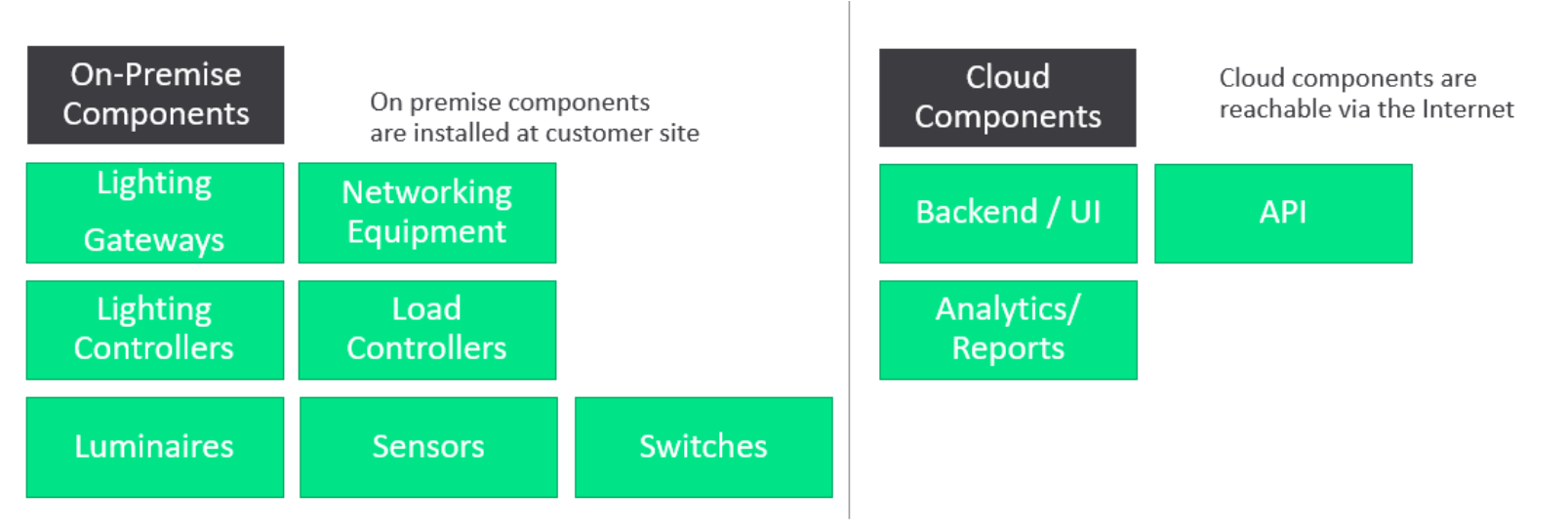
On-premise components are installed at the customer site (lighting gateways, networking equipment, lighting controllers, load controllers, luminaires, sensors, switches). Cloud components are reachable via the internet (backend / UI, API, analytics / reports).
Responsibility for security is typically shared between the manufacturer (Signify) and the customer.
Shared responsibility model
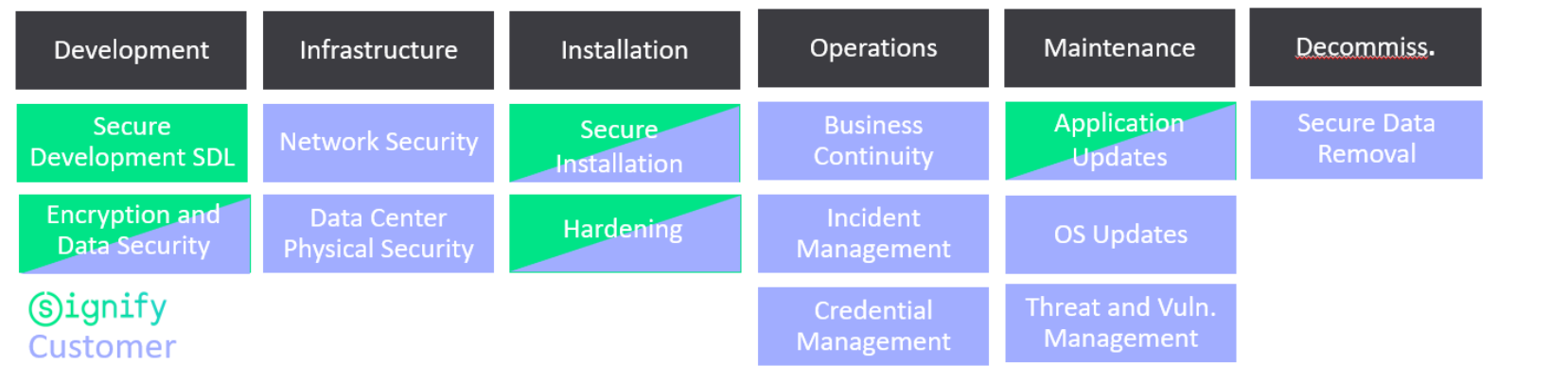
Security activities across the lifecycle — Development (Secure Development SDL, Encryption and Data Security), Infrastructure (Network Security, Data Center Physical Security), Installation (Secure Installation, Hardening), Operations (Business Continuity, Incident Management, Credential Management), Maintenance (Application Updates, OS Updates, Threat and Vulnerability Management), and Decommissioning (Secure Data Removal) — are divided between Signify and the customer depending on the deployment.
Responsibilities
The data below is for reference only, as well as the responsibilities. Each system may have different requirements and activities.
| Activity | Phase | R&D | Sys Exp | Sys & Serv | CSAT | 3rd party (Customer) |
|---|---|---|---|---|---|---|
User Credentials Management |
||||||
Request a new account |
Operations |
R |
R |
R |
||
Approve request |
I |
A |
A |
R |
||
Create |
R |
I |
I |
I |
||
Update |
R |
I |
I |
I |
||
Delete |
R |
I |
I |
I |
||
System Keys Management |
||||||
Generation |
||||||
Storage |
||||||
Sharing |
||||||
Certificates (web) |
||||||
Provisioning |
R |
|||||
Renewal |
R |
|||||
Application Management |
||||||
Update / Upgrade |
Operations |
R |
C |
I |
I |
I |
Configuration |
Installation |
C |
R |
R |
I |
|
Infra / Network / 3rd party |
||||||
Installation |
Installation |
C |
R |
I |
I |
|
Hardening (if Signify delivers network) |
Installation |
C |
R |
R |
I |
|
Hardening (if customer server + OS) |
Installation |
C |
I |
I |
R/A |
|
Patching / Maintenance (if Signify delivers network) |
Maintenance |
C |
R |
R |
I |
|
Patching / Maintenance (if Customer delivers network) |
Maintenance |
C |
I |
I |
R/A |
|
BACnet Integration with BMS |
Installation |
C |
C |
R/A |
||
BACnet Integration with BMS |
Operations |
C |
C |
R/A |
||
Licensing |
||||||
External Components License Provisioning - Signify Delivered Network |
Installation |
C |
R/A |
R/A |
I |
|
External License Renewal - Signify Delivered Network |
Operations |
C |
R/A |
R/A |
I |
|
Backups |
Business Continuity |
|||||
Backup Procedure |
Installation |
R/A |
||||
Configuration / Data Backup |
Operations |
R/A |
||||
System Development |
||||||
Hardening |
Development |
R/A |
||||
Monitoring |
||||||
Scanning for Vulnerabilities |
Operations |
R/A |
||||
Performance Monitoring (Availability) |
Operations |
R/A |
||||
Incident Management |
||||||
Report |
Operations |
R/A |
Legend: R = Responsible, A = Accountable / Approve, C = Consulted, I = Informed
Security installation requirements
The Signify Interact for Intelligent Buildings gateways communicate with the cloud via a customer’s IT network using IPv4. Each gateway needs to receive an IP address from a DHCP server on that network. The use of static IP addresses for gateways is not possible.
All connections from Signify Interact for Intelligent Buildings devices to cloud services are initiated by the gateway using dedicated URLs and ports. New connections created outside the network are not allowed. Secure communication is always initiated by a gateway of the Signify Interact for Intelligent Buildings system. Communication between the gateways and the cloud uses the HTTPS protocol which uses the standard TCP port 443. MQTT messages are also sent using this port. The benefit is that only standard web browser ports need to be opened up for Signify Interact for Intelligent Buildings devices to communicate with the cloud.
For the list of URLs and ports used by Signify Interact for Intelligent Buildings, see Network Requirements.
Optionally, when allowed on the customer’s IT network, UDP port 123 needs to be open to allow for NTP (Network Time Protocol) time synchronization.
These URLs and ports need to be whitelisted using the security framework of the customer’s IT network to allow for communication between Signify Interact for Intelligent Buildings gateways and the cloud.
Note that the non-connected configuration doesn’t impose any requirements on the customer’s IT network. Only the phone used for setup and control of the system needs to be able to connect to the cloud platform for backup purposes.
Reporting security incidents
Security incidents for Signify Interact for Intelligent Buildings are to be reported via its support channels, either the local support call center or the Customer Satisfaction team of the market.
Signify supports responsible vulnerability disclosures and encourages researchers and ethical hackers to report identified vulnerabilities. For more information on Signify responsible disclosure, visit the vulnerability disclosure page.
Legal disclaimer
This information is provided for informational purposes only. It represents the current product information as of the date of publication. These are subject to change without notice.
Customers are responsible for making their own independent assessment of Signify products or services and the use thereof. This information is provided "as is" without warranty of any kind, whether express or implied. This information does not create any warranties, representations, contractual commitments, conditions, or assurances from Signify, its affiliates, suppliers, or licensors. The responsibilities and liabilities of Signify and its customers are defined in the agreements between Signify and its customers. This information is not part of, nor does it modify, any agreement between Signify and its customers.
Learn more about Interact — https://www.interact-lighting.com
© 2026 Signify Holding. All rights reserved.
The information provided herein is subject to change, without notice. Signify does not give any representation or warranty as to the accuracy or completeness of the information included herein and shall not be liable for any action in reliance thereon. The information presented in this document is not intended as any commercial offer and does not form part of any quotation or contract, unless otherwise agreed by Signify.
All trademarks are owned by Signify Holding or their respective owners.