Integration using a third-party BACnet device
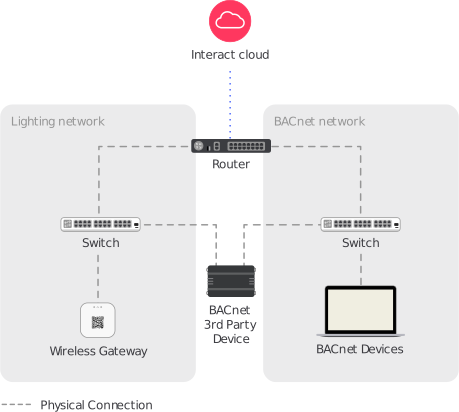
This architecture uses the Wireless Gateway which exposes the BACnet points as described in the Developer portal.
The third-party BACnet system can be hosted on a different network but in order to support this architecture, the BACnet system requires a device such as:
-
BACnet router
-
BBMD
-
JACE with two ethernet ports
One device is connected to the lighting network and the other device to the BACnet network.
| Signify DOES NOT provide or configure BACnet device. Integration must be done by a third party. For integration, no additional network changes are needed in lighting, in case Signify provides router or switches. |
Network requirements
| Customer-delivered networks must meet the network requirements specified in the Network requirements section. |
Signify-delivered networks use a configuration file for a Signify validated network router.
The files are available in the Downloads page.
It allows a third-party device to communicate with Wireless Gateways running the BACnet stack.
ACLs
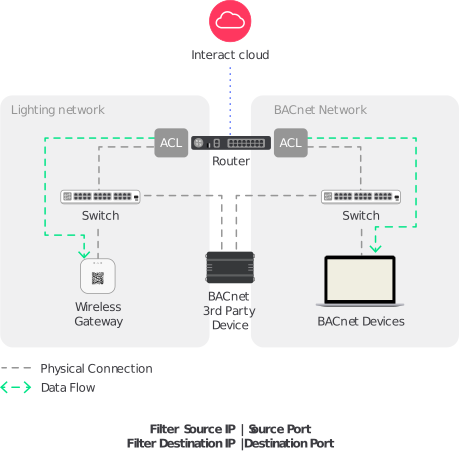
ALCs or access control lists can be used to limit the access from third-party networks to lighting network using the BACnet port 47808.
| The ACLs must be applied in the customer’s and lighting networks. |
The following ACLs are required.
-
ACLs must be applied between lighting and BACnet VLANs, and must be filtered based on:
-
source IP address
-
destination IP address
-
source port
-
destination port
-
-
Traffic from the BACnet VLAN must be filtered, allowing only the BACnet gateway to reach the IP address from the Wireless Gateway and standard BACnet port. The traffic initiator is the BACnet gateway.
-
Traffic from the Wireless Gateway must be able to reach the BACnet gateway.
-
All other traffic between the lighting and BACnet VLANs must be dropped.